Best Background Noise Removal App
When the noise behind your voice is music, the best background noise removal app separates instead of filtering. Upload a podcast, voice over or interview and get the voice and the music back as two clean tracks.
Remove Background Music
Background Noise Removal on a Real Cafe Clip
We made a short podcast intro with a host talking over loud jazz from a cafe sound system, then ran one separation. Play the original mix, then the voice track it returned, unedited. This is what the best background noise removal app should do with music.
Original mix
Host voice with cafe piano, upright bass and brushed drums underneath
Voice only
The vocal track from AI Vocal Remover mode, with the cafe music gone
Listen to the pauses between sentences. The music is not just turned down there; it is gone.
Background Noise Removal That Separates the Voice From Music
A thread about cleaning noisy recordings put it simply: "The separation one can separate out vocals, while the noise suppression one suppresses noise." Music is not steady noise. It changes every bar and shares its range with speech, so a filter that learns one noise profile cannot follow it. A best background noise removal app for music has to tell the voice apart from the band.
A noise filter
- Learns one steady noise profile
- Loses track when the music changes
- Adds artifacts the harder you push it
Separation
- Recognizes the voice itself
- Follows music that changes every bar
- Returns the music as a second track
Background Noise Removal Without the Underwater Sound
One person who pushed a noise reduction effect said the voice ended up sounding like it's underwater or in a tunnel. A film editor found that AI background removal damages the quality of the dialogue once it goes past a few percent. The best background noise removal app for dialogue over music should leave the voice alone.
- No strength slider
- The voice is lifted out as a whole, so there is nothing to over push.
- Quiet gaps
- Pauses between phrases drop to near silence in the voice track.
- Music kept aside
- The removed music comes back as its own file if you still need it.
If the music is as loud as the voice, faint traces can remain. Steady hum, hiss and room echo are not touched at all.
A Background Noise Removal App With No Plugins
A beginner recording in Reaper found it keeps a ton of background noise he would have to filter out each time, and the answer he got was blunt: "No DAW does this, you need a plugin or a different software." For a first recording, the best background noise removal app is one that runs in a browser tab.

Upload audio
MP3, WAV, OGG, M4A, AAC, FLAC or WMA
Or use My Music
Pick a track already in your workspace
Choose one mode
AI Vocal Remover returns voice and music
Download
Two tracks, ready for your editor
What This Background Noise Removal App Will Not Remove
Someone filming equipment in a room full of server cooling fans needs a different tool. Know which sound you have before you choose the best background noise removal app for it.

| Music behind the voice | Removed into its own track |
|---|---|
| Other people talking | Stays with the voice |
| Fan or air conditioner hum | Not removed |
| Mic hiss and electrical buzz | Not removed |
| Room echo | Not removed |
For steady noise, use a dedicated denoiser on the voice track, or fix the room before you record.
Four Steps to a Clean Voice With Background Noise Removal
Using the best background noise removal app takes four steps on the Vocal Splitter page. The panel shown is the real page with AI Vocal Remover selected and nothing uploaded yet.
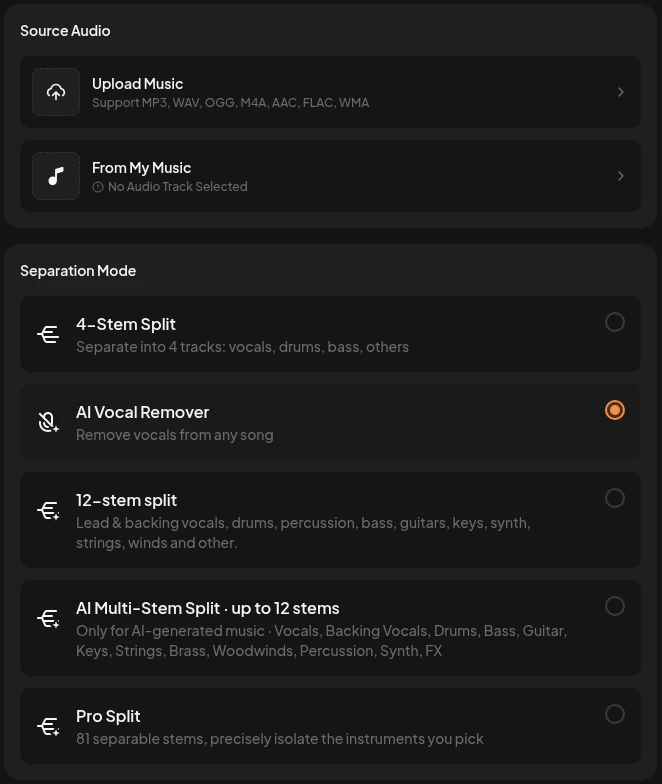
Export the audio
Save the sound from your video or recorder as an MP3 or WAV file.
Upload the file
Use Upload Music, or pick a track From My Music.
Pick AI Vocal Remover
This mode returns the voice and the music as two tracks.
Download both tracks
Use the clean voice and keep the music if you want it later.
Frequently Asked Questions
What is the best background noise removal app for music behind a voice?
Use a separation tool. Choose AI Vocal Remover on the Vocal Splitter page and you get the voice and the music as two files.
Can it remove fan noise, hum or hiss?
No. It separates voice from music. Steady fan noise, electrical hum, mic hiss and room echo stay in the voice track and need a dedicated denoiser.
Will other people talking in the background be removed?
No. Other voices count as vocals, so they stay in the voice track with the host.
Which files can I upload?
Audio files in MP3, WAV, OGG, M4A, AAC, FLAC or WMA, or a song from My Music. Export the audio from a video first.
Do I need a DAW or plugins?
No. Upload the file in your browser, pick a mode and download the tracks.
Can I keep the music track too?
Yes. The music comes back as its own track, so you can lower it, replace it or use it elsewhere.
Clean Your Podcast With the Best Background Noise Removal App
Upload one clip with music behind the voice and hear the voice on its own.
Remove Background Music